



Introduction
Ask an IT team what eats up their week, and you’ll hear the same answers: repeat tickets, noisy alerts, and fixes someone has already done a hundred times. AI-powered automation in IT goes after exactly that work. Instead of only running scripts on a schedule, it reads what’s happening across your systems, decides what matters, and acts.
Adoption is already wide. In McKinsey’s 2026 State of AI survey, nearly nine in ten respondents said their organizations use AI regularly. IT was among the functions where companies most often reported scaling AI agents. The appeal is simple: less manual work and faster fixes.
What Is AI-Powered Automation?
AI-powered automation in IT uses artificial intelligence, mainly machine learning and large language models, to handle tasks that normally need a person to size up the situation. Classic automation follows fixed instructions, like sending an alert when a disk hits 90%. AI-powered automation can work out why the disk is filling up, check whether it’s happened before, and choose the right fix.
That added judgment lets AI handle messy inputs, such as a vaguely worded ticket or ten alerts that are really one problem. Most teams use both approaches, with AI deciding what should happen and conventional tools carrying it out.
Why AI Automation Matters for Modern IT Teams
IT environments keep getting more complicated, and IT teams rarely grow at the same pace. A typical company runs workloads across on-premises servers, public clouds, and dozens of SaaS apps, each producing its own logs, metrics, and alerts. No team can watch all of that in real time.
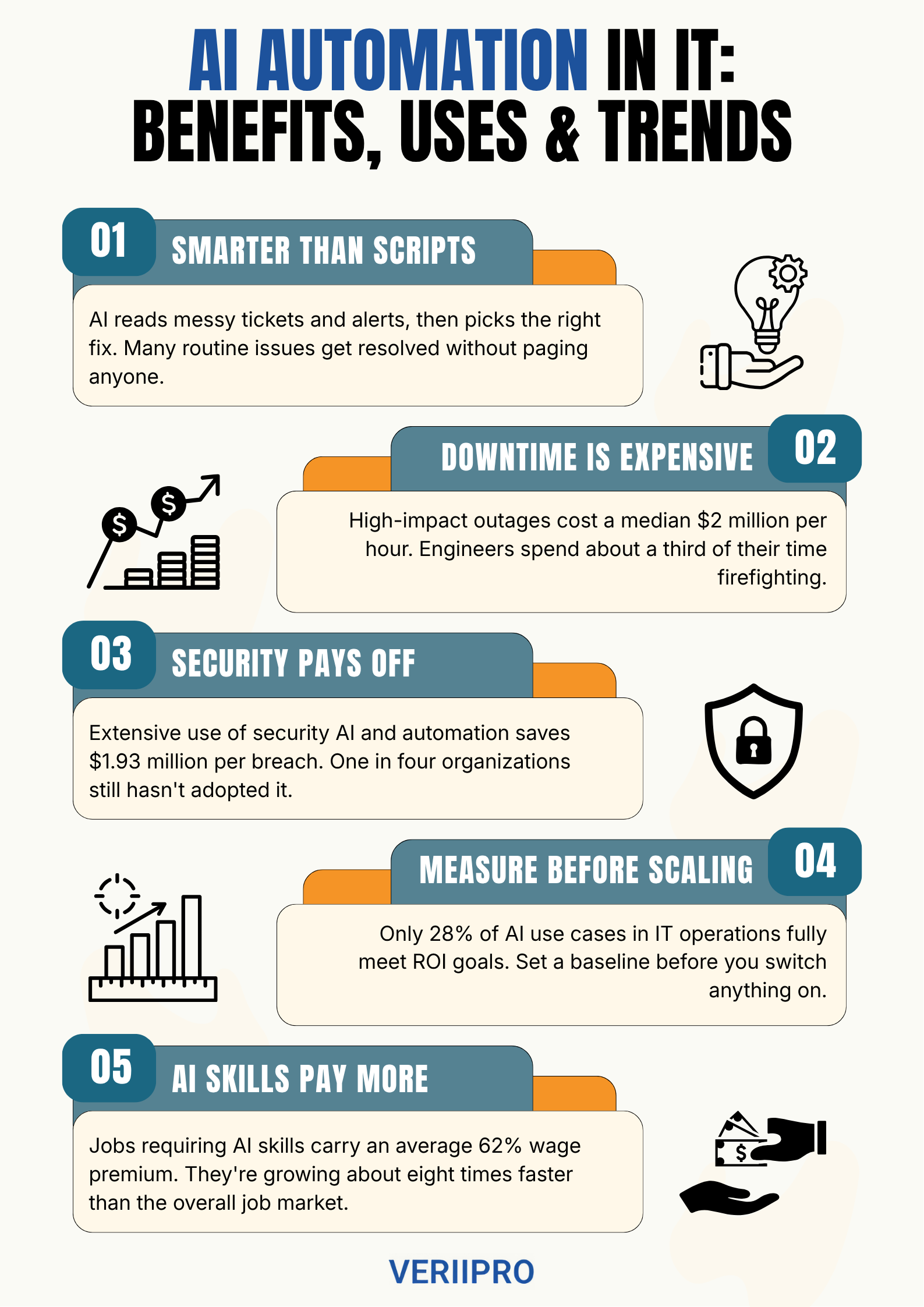
That gap gets expensive fast. New Relic’s 2025 Observability Forecast put the median cost of a high-impact outage at $2 million per hour. It also found that engineers spend about a third of their time firefighting. AI automation catches problems earlier, narrows down causes faster, and takes routine fixes off people’s plates.
AI Automation vs Traditional Automation vs RPA
These three often get lumped together, but they solve different problems.
| Traditional automation | RPA | AI-powered automation | |
|---|---|---|---|
| How it works | Scripts, schedulers, and fixed rules | Bots that copy human clicks and keystrokes | Models that analyze data, decide, and act |
| Best for | Stable jobs like backups and patching | Rule-based work in apps without APIs | Variable work like triage and root cause analysis |
| When inputs change | Breaks or needs a rewrite | Breaks when screens change | Adapts within the guardrails you set |
| Main advantage | Cheap, predictable, and easy to audit | Quick to deploy on legacy systems | Handles unstructured data and exceptions |
| Main drawback | Rigid | Brittle and high-maintenance | Needs good data, oversight, and cost control |
Traditional automation is still the right tool for anything that never changes, since nobody needs a neural network to rotate logs at midnight. RPA bridges older systems that lack APIs, but bots break when a vendor redesigns a screen. AI handles the unpredictable work at a higher cost to run and govern. The best setups use all three, with AI figuring out what’s wrong and scripts or bots doing the clicking.
How AI-Powered Automation Works
Whether a product calls it AIOps or an agent, most AI automation in IT runs the same loop.
Data collection. The system pulls in logs, metrics, traces, tickets, and configuration changes. It can only reason about what it can see.
AI analysis. Models spot anomalies, group related alerts, suggest likely causes, and read tickets to understand requests.
Automated execution. The system restarts a service, rolls back a deployment, or opens a ticket with the diagnosis attached. Riskier actions wait for human approval.
Continuous monitoring. It confirms the fix worked and feeds the outcome into the next response.
Picture a database server running low on disk space at 2 a.m. The system spots the trend, traces it to a stuck log rotation job, clears the old files, and leaves a note for the morning shift instead of paging anyone.
Types of AI Automation Used in IT
The labels overlap, and vendors use them loosely. Here’s what each one usually means today.
Robotic process automation (RPA). RPA uses bots that mimic a person’s clicks and keystrokes to move data between apps. It’s rule-based on its own and becomes AI automation once paired with models that can read documents or tickets.
Intelligent automation. This is that pairing, made standard. It adds machine learning and language processing to RPA and workflow tools, so a process can handle an emailed request or a scanned form.
Hyperautomation. Gartner uses the term for an organized, business-led push to automate every process worth automating. Think of it as a strategy that ties RPA, AI, process mining, and integration tools together.
AIOps. The name is short for AI for IT operations. Gartner describes it as using big data and machine learning to automate operations work such as correlating events, spotting anomalies, and pinpointing causes.
Agentic AI. AI agents plan multistep tasks, use tools, and act toward a goal with limited supervision, like investigating an alert across three systems.
Autonomous IT operations. This is the end state, where systems detect, diagnose, fix, and verify issues while people supervise. For now it exists only in narrow slices, like autoscaling.
Key Benefits of AI-Powered Automation in IT
The first thing most teams notice is improved efficiency, as password resets, access requests, alert triage, and routine patching run with little human effort. Cost savings follow, usually less from cutting staff than from shorter incidents, fewer outages, and less wasted cloud capacity.
Enhanced security is where the numbers are hardest to ignore. According to IBM’s 2026 Cost of a Data Breach research, organizations using security AI and automation extensively saved an average of $1.93 million per breach compared with those using none.
Faster issue resolution comes from alerts that arrive already grouped, with a likely cause attached, so the on-call engineer starts halfway to the answer. Add it up and you get increased productivity without adding headcount.
Top AI Automation Use Cases in IT
IT service management (ITSM). This is where AI has the clearest track record. In a Gartner survey of 782 infrastructure and operations (I&O) leaders, 53% placed their AI wins in ITSM, where virtual agents resolve requests and route tickets.
Cloud operations. AI rightsizes instances, shuts down idle resources, and forecasts spending. Flexera’s 2026 State of the Cloud Report estimates that 29% of cloud spend is wasted, so there’s plenty to fix.
DevOps. AI helps write and review code and flags risky deployments before they ship. In Google Cloud’s 2025 DORA report, 90% of technology professionals said they use AI at work.
Cybersecurity. AI triages alerts and contains attacks. IBM reports that more than half of breached organizations use agents for threat detection and containment, but only 18% use them for vulnerability management.
Software testing. AI generates test cases and repairs scripts when interfaces change, which matters because 30% of DORA respondents have little or no trust in AI-generated code.
Infrastructure monitoring. AIOps tools learn what normal looks like and alert on real deviations instead of fixed thresholds, cutting the noise that wakes on-call engineers at night.
Popular AI Automation Platforms & Tools
Most IT shops end up combining two or three of these.
Microsoft Copilot. For IT, the useful pieces are Copilot Studio for building custom agents and Security Copilot, whose agents handle work like alert triage. Microsoft now includes Security Copilot with Microsoft 365 E5.
UiPath. The RPA pioneer has shifted toward agentic automation, and its Maestro orchestration layer coordinates AI agents, robots, and people in one governed process.
ServiceNow. It’s a go-to ITSM platform, now built around AI agents and agent governance. The company closed its Moveworks acquisition in December 2025 to strengthen its employee-facing assistant.
Datadog. Its Bits AI SRE agent investigates alerts around the clock and surfaces likely root causes, often before an engineer logs in.
Splunk. Now part of Cisco, Splunk correlates alerts to cut noise and has been adding AI-assisted troubleshooting and AI agent monitoring.
Automation Anywhere. It’s another RPA veteran, now pitching agentic process automation. The company says its Autonomous Service Desk has handled more than a billion IT service requests, a vendor claim but a telling one.
Challenges of Implementing AI Automation
AI automation projects tend to stall for predictable reasons.
Data quality. In Gartner’s I&O survey, 38% of leaders blamed poor or limited data for AI project failures, and the same share of those with setbacks cited skills gaps. Stale records in a configuration database will send even a capable agent the wrong way.
Security. Every agent that can act is also a target. More than one in five organizations in IBM’s 2026 study reported a breach aimed at AI models or applications, often through compromised APIs, plug-ins, or cloud misconfigurations.
Governance and compliance. Someone has to decide what each agent may do, who approves risky actions, and how decisions get logged. Regulated companies also have to prove that automated actions followed the rules.
Legacy systems. Older platforms often lack clean APIs, which is a big reason RPA hasn’t gone away.
Employee adoption. In McKinsey’s survey, 47% of mid-level managers and individual contributors reported at least one AI-related strain at work, versus 31% of executives. If the people closest to the work aren’t on board, the tools sit unused.
Best Practices for Successfully Implementing AI Automation
Identify the right use case. Start with high-volume, measurable, low-risk work like password resets or ticket routing, and leave anything that can take down production for later.
Start with a pilot project. Set a fixed scope, a budget, and success criteria in advance, and keep the timeline short.
Measure performance. Record a baseline before you switch anything on, or you’ll never know what changed.
Scale gradually. Expand once the first use case is stable, and give agents more autonomy as they earn trust. Redesign the process along the way, too. McKinsey reports that nearly three-quarters of AI high performers fundamentally redesigned workflows, compared with about a quarter of other companies.
Measuring the ROI of AI Automation
Proving value is harder than it sounds. Only 37% of McKinsey’s respondents said AI had contributed to their company’s earnings (EBIT). Gartner’s I&O research is starker: just 28% of AI use cases in infrastructure and operations fully met ROI expectations. Part of the problem is measurement. McKinsey’s high performers were twice as likely as others to have defined processes for measuring impact.
Track these four areas:
- Cost savings: Cost per ticket, cloud spend per workload, and manual hours eliminated, weighed against license, usage, and staff costs.
- Productivity gains: Tickets resolved without a human and engineering hours shifted from firefighting to projects.
- Downtime reduction: Mean time to detect (MTTD) and mean time to resolve (MTTR). At New Relic’s median of $2 million an hour, cutting 15 minutes from a major outage saves about $500,000.
- SLA improvements: The share of tickets and incidents resolved within your service level agreements.
Future Trends in AI-Powered Automation
The types above describe what’s running now. Here’s where they’re headed.
Agentic AI. Gartner predicts that 40% of enterprise applications will include task-specific AI agents by the end of 2026, up from under 5% in 2025. It also expects over 40% of agentic AI projects to be canceled by the end of 2027 due to costs, unclear value, or weak risk controls. Both will probably prove true.
Hyperautomation. The idea is maturing into orchestration, with vendors like UiPath and Automation Anywhere coordinating bots, agents, and human approvals in one flow.
AI copilots. Assistants that suggest are becoming agents that act. Gartner warns about “agentwashing,” where vendors market basic assistants as agents, so check what a tool can do on its own.
Self-healing IT. Expect small fixes first, like restarting a hung service or rolling back a bad release. Gartner’s I&O survey saw failures cluster in auto-remediation and self-healing infrastructure when expectations outran the tools.
Autonomous operations. Autonomy won’t mean nobody’s watching. Gartner says highly autonomous agents need the strictest governance, including continuous monitoring, fast rollback, and circuit breakers that halt an agent when it exceeds set limits.
AI Automation Careers in Demand
Automation creates work as well as removing it, since someone has to design the workflows, connect the systems, and secure the agents. In-demand roles include:
- AI automation engineer: Builds workflows that combine RPA, APIs, and AI models.
- AIOps engineer or site reliability engineer (SRE): Tunes monitoring, alert correlation, and auto-remediation.
- MLOps engineer: Keeps models and agents reliable in production.
- Security automation engineer: Builds detection and response playbooks.
- AI governance specialist: Defines what agents can and can’t do.
The Bureau of Labor Statistics projects 21% growth for information security analysts from 2025 to 2035 (median pay: $129,180) and cites increased AI use as one factor. It also projects 10% growth for software developers, QA analysts, and testers. PwC’s 2026 Global AI Jobs Barometer shows jobs requiring AI skills growing about eight times faster than the overall market, with a 62% average wage premium.
Employers want Python, API and integration experience, cloud skills, and familiarity with ITSM and observability tools. Judgment matters just as much, and PwC’s data shows AI-exposed entry-level roles in the U.S. are seven times more likely to require traditionally senior skills like leadership.
Ready to put those skills to work? Browse current openings on VeriiPro’s job portal.
Conclusion
AI-powered automation in IT is already doing real work, from resolving tickets and cutting alert noise to catching threats and trimming cloud waste. The organizations getting the most from it pick a clear problem, measure honestly, clean up their data, and give agents more responsibility only as it’s earned.
Waiting carries its own cost, since outages, breaches, and manual busywork aren’t getting any cheaper. Start with one painful process, prove the value, and build from there.